
CollabHub: A High-Performance Custom SaaS Collaboration Tool
A secure, cloud-native platform designed to bridge the gap between document creation and real-time team communication. Built for speed, security, and mobility.
PWA Ready: Install CollabHub on your desktop or mobile device for a seamless, on-the-go experience.
Layer | Technologies | purpose |
|---|---|---|
User Interface | Next.js + Mantine UI | Delivering a fast, SEO-friendly, and professionally designed interface. |
State Management | Zustand | Handling complex document and chat data across the application smoothly. |
Backend | NestJS (Node.js) | A modular, enterprise-grade server architecture for reliable data handling. |
Database & ORM | Supabase & Drizzle | Securely storing workspace data with 100% type safety and high performance. |
Real-Time | Socket.io (WebSockets) | Powering the instant document sync and live team chat features. |
Background Tasks | BullMQ & Redis | Handling email invites and heavy processes without slowing down the user. |
Deployment | Vercel & Render | Providing a high-availability cloud environment for global access. |
The Challenge: When Work and Communication are Disconnected
Most teams struggle with context switching. They write documents in one tab and chat about them in another (like WhatsApp or Slack). This leads to fragmented feedback, lost information, and a lack of focus. For a fast-moving business with diverse teams, this friction slows down productivity and decision-making.
The Solution: A Context-First Collaboration Engine
I built CollabHub to keep the conversation where the work is. By integrating a real-time chat gateway directly into every document, I eliminated the need for external messaging apps.
Live Collaboration: Edit documents with teammates in real-time with zero-lag synchronization.
Contextual Chat: Every document has a dedicated chat sidebar, keeping all discussions organized and relevant to the task at hand.
Instant Updates: Using WebSocket technology, every change and every message is reflected across the team in seconds.
Engineered for Speed and Reliability
To make a cloud-native application feel as fast as a local desktop tool, I implemented a System-First architecture. This ensures the app stays responsive even when handling complex tasks like real-time document syncing and large-scale team notifications.
I integrated Redis to act as a high-speed memory layer. By caching workspace data for 10 minutes, I reduced the load on the primary database, resulting in near-instant page loads and a more reliable experience for active users.
UX is about perceived speed. When an admin invites a new member, the frontend confirms the action immediately. The heavy lifting, sending the invitation email, is handled in the background by BullMQ, ensuring the user never waits on a loading spinner.
Using NestJS, I built a structured, enterprise-grade server. This modular approach allowed me to isolate document synchronization from chat logic, making the system easier to scale and maintain as new features are added.
Security & Role-Based Access (RBAC)
Granular Control and Data Security
Collaboration requires trust. I engineered a robust permission system that ensures every user has the exact level of access they need, nothing more, nothing less. This architecture protects sensitive data while giving admins the tools they need to manage their teams.
The Tech Behind the Security
Using NestJS Guards and Role-Based Authorization, I built a Gatekeeper layer. Every request made to the server is validated against the user’s role and the specific workspace ID, ensuring that data stays isolated and secure within its own workspace context.
Workspace Owner
Full control over the workspace, including the ability to edit settings or delete the entire workspace.
Admin
Empowered to manage the team, invite new members, and assign roles to keep the project moving.
Member
Focused on the work, can create and edit documents and participate in real-time chats.
User-Centered Design: Built for Focus
A powerful tool is only useful if it’s intuitive. I spent significant time mapping out the user journey to ensure that complex features, like workspace switching and role management, feel natural and require zero learning curve.
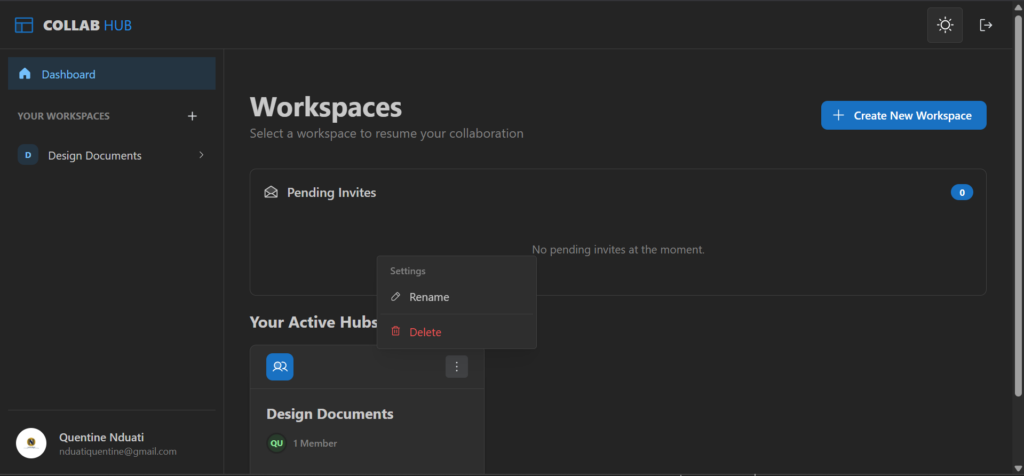
The “Command Center” Dashboard
Using the Mantine UI framework, I designed a unified dashboard that gives users a bird’s-eye view of their workspaces and active documents. I prioritized Clean Space to reduce cognitive load, allowing teams to focus on their work rather than a complex interface.
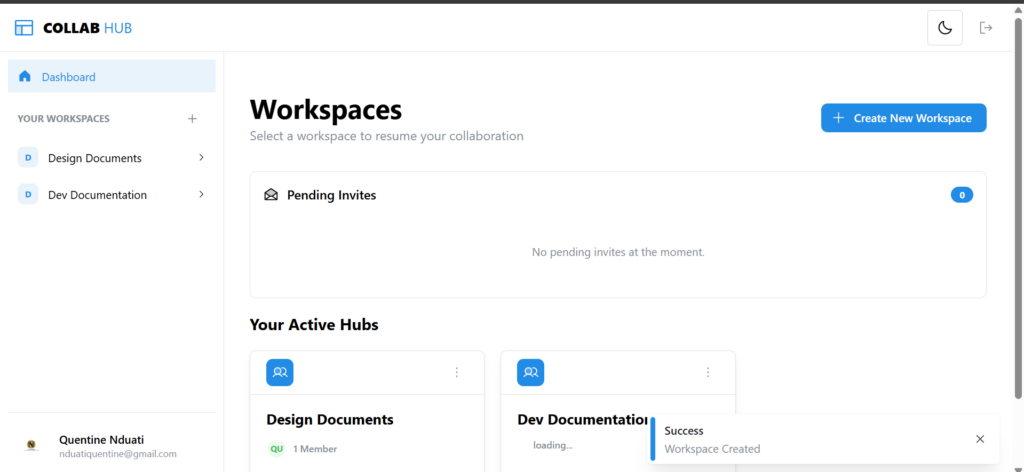
Real-Time Feedback Loops
UX is about communication. I implemented toast notifications and loading states for every action. Whether it’s a successful document save or a background email being sent via background tasks, the user is always informed of the system’s status.
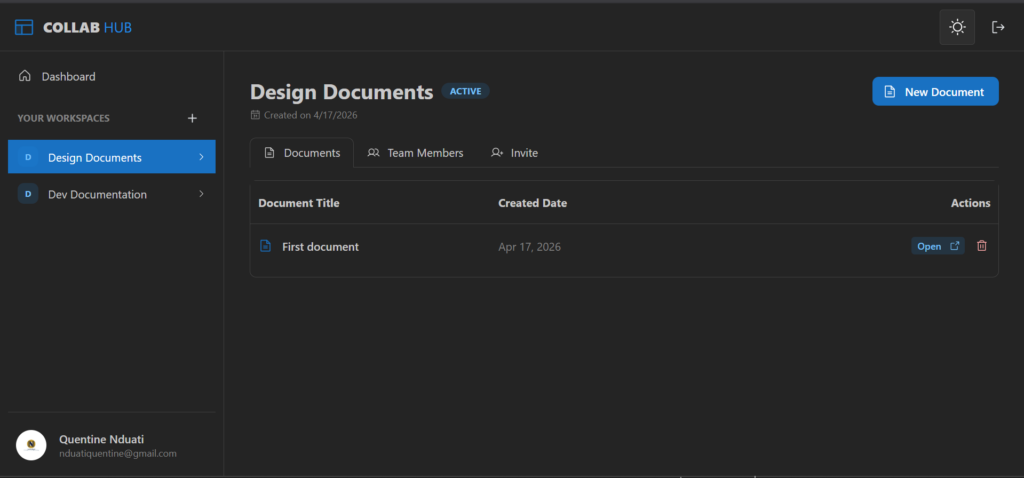
Design-to-Code Precision
This project followed a strict Figma-first workflow. By prototyping the entire UI before writing a single line of code, I was able to refine the spacing, typography, and Dark Mode accessibility, ensuring a premium UI feel across all devices.
Scalable Infrastructure for a Global Reach
To ensure CollabHub remains fast and accessible from anywhere, I deployed the application using a distributed cloud architecture. By leveraging specialized services for each part of the stack, I optimized for both performance and data integrity.
The Always-On Strategy
I configured the deployment pipeline to support Continuous Integration (CI/CD). This means every improvement I make is automatically tested and deployed, ensuring the platform stays modern without ever going offline.

User Interface (Vercel)

Logic Engine (Render)

Database (Supabase)
Memory & Tasks (Upstash)
The Progressive Web App (PWA) Advantage
CollabHub is fully PWA-compatible. This means you can “install” the platform directly onto your laptop or mobile phone without visiting an app store. It offers a fast, app-like experience with quick loading times and a dedicated home-screen icon for instant access.
The Roadmap: What’s Next?
I am currently engineering a dedicated mobile application using React Native (Tamagui design system) which will share the NestJS backend with the web user interface. By sharing the core logic from the web platform (Zustand and Yup validations), I am ensuring a seamless, single-engine experience across all devices. Future updates will also include offline-first capabilities, allowing teams to continue working even during intermittent connectivity.
Experience CollabHub Live
Ready to see modern collaboration in action? You can explore the platform right now.
Important Note: To keep this project accessible for testing, I am using a starter hosting environment. Because the server “sleeps” during inactivity, please allow up to 3 minutes for the system to “wake up” when you first register or log in. Once the initial connection is established, the platform will remain fast and responsive for your entire session. Once you’ve explored the features, please return to this page and click here to navigate to the feedback form below to share your experience and any suggested improvements.
Beta Tester Feedback & Feature Requests
Great software isn’t built in a vacuum, it’s shaped by the people who use it. Whether you’ve noticed a small technical detail that could be improved, found a bug during the server wake-up phase, or have a big picture idea for a feature that would add massive value to your workflow, I want to hear it. This project is a living system, and your insights are the primary driver for its next set of updates.